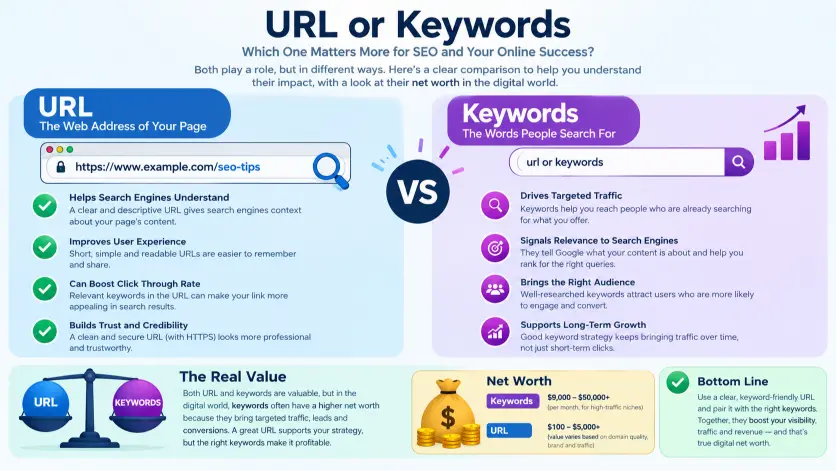
When people start learning about websites and online search, terms like URLs and keywords can easily become confusing. Although both are connected to how people find and understand web content, they have completely different purposes. Understanding URL or Keywords begins with a simple distinction: a URL identifies a specific webpage, while keywords are the words or phrases people type or use when searching for information. Learning this difference can help beginners understand websites more clearly and create content that matches what visitors are looking for.
A clear and descriptive URL gives visitors and search engines useful information about a webpage before they open it. Keywords, on the other hand, help content creators understand the topics, questions, and phrases their audience is interested in. Both can contribute to a well organized website when they are used naturally and appropriately. Instead of treating either one as a shortcut to better visibility, website owners can focus on creating useful information, clear page structures, descriptive addresses, and content that directly satisfies the needs of their audience.
In this guide, we will explore URL or Keywords in a simple and practical way. You will learn what each term means, how they differ, where they are used, and how they can work together within a website. We will also cover common mistakes and provide easy examples for beginners. Whether you are a blogger, student, website owner, content creator, or digital marketer, understanding these basic concepts can help you make more informed decisions when creating and organizing online content.
URL or Keywords: What Is the Difference?
Although a URL and keywords can appear together during an online search, they perform completely different functions. A URL, short for Uniform Resource Locator, identifies the location of a particular resource on the web. It can lead directly to a webpage, image, document, video, or another online resource.
Keywords, by comparison, are words or phrases that communicate what someone wants to discover. A person might type “best grammar lessons” into a search field without knowing which website contains the desired information.
Therefore, a URL points toward a destination, whereas keywords describe an information need. This distinction becomes especially useful when creating website content, planning online research, filling out digital forms, or explaining how search systems work.
| Feature | URL | Keywords |
|---|---|---|
| Part of speech | Noun | Noun |
| Basic meaning | Address of an online resource | Word or phrase describing a search topic |
| Main purpose | Identifies a destination | Expresses an information need |
| Typical location | Browser address bar | Search field |
| Example | https://example.com/about | “grammar rules” |
| User action | Opens a specific resource | Searches for relevant resources |
| Nature | Specific | Usually broader |
| Primary function | Navigation | Discovery |
The easiest distinction is simple: a URL tells you where something is.
Keywords tell you what you are looking for.
Consequently, replacing one with the other can change the meaning of an instruction.
For example, “Enter the URL” means that someone should provide a web address. Conversely, “Enter relevant keywords” means that the person should provide words describing a subject or search intention.
Is URL or Keywords a Grammar, Vocabulary, or Usage Issue?
The question of URL or keywords is primarily a vocabulary and usage issue rather than a conventional grammar problem. Both expressions are grammatically valid, yet they identify different concepts.
A URL is normally used when a precise online destination is required. For instance, a form might ask for the URL of a company website. The expected response would be a web address rather than a descriptive phrase.
Keywords, however, are appropriate when the subject or information need matters more than the destination. A researcher could enter “renewable energy benefits” into a search field because the objective is to discover relevant material.
Furthermore, these expressions aren’t interchangeable. Substituting one for the other can make an instruction unclear or produce an unsuitable response.
In formal writing, technical documentation, academic instructions, and workplace communication, precision is particularly important. Casual conversations may tolerate vague wording, but professional contexts usually benefit from specifying whether someone should provide an address or a search phrase.
The distinction also matters in educational settings. A teacher asking students to “search using keywords” expects descriptive terms. Meanwhile, an instructor asking students to “visit the following URL” expects a specific destination.
Therefore, the grammatical construction may be correct in either case, while the vocabulary choice determines whether the message communicates the intended task.
URL: Meaning, Function, and Practical Usage
A URL functions as an address for an online resource. When someone enters a complete URL into a browser, the browser uses that address to locate the requested destination.
A typical URL can contain several components, including a scheme, domain name, path, query parameters, and sometimes a fragment. For example, a web address might identify a particular article within a larger website.
Because URLs can be highly specific, they are useful whenever direct navigation is required. A company may provide its homepage address to customers. A university might distribute a URL for an enrollment portal. A software manual could include an address leading to a particular documentation page.
Workplace Example
Suppose a manager asks an employee to send the URL for a company report. The employee should provide the web address that opens the report.
Writing “annual financial report” would not satisfy the request because those words describe the subject rather than identify the actual destination.
Academic Example
A professor may tell students to open a specific journal article through a provided URL. In this situation, the address directs students toward the intended source.
Conversely, asking students to search for “climate change adaptation studies” requires keywords rather than a predetermined address.
Technology Example
Developers regularly work with URLs when testing websites, connecting services, examining application routes, or documenting resources. A URL can identify a page, endpoint, file, or service location.
Therefore, understanding its structure helps users communicate accurately with technical teams.
URL Usage Recap
Use a URL when a particular online destination is known.
Use it when navigation is the objective.
Provide the complete address when someone specifically requests a web location.
Keywords: Meaning, Function, and Practical Usage
Keywords are words or phrases that represent a subject, question, product, problem, or information need. They can be short, such as “grammar,” or more descriptive, such as “difference between British and American spelling.”
Unlike a URL, a keyword phrase doesn’t normally identify one exact webpage. Instead, it helps a search system understand what the user wants to discover.
For that reason, keywords can be broad or highly specific. Someone researching language could use “English grammar,” while another person might search for “when to use affect instead of effect.”
Workplace Example
Imagine a marketing employee researching customer questions about a new product. Instead of entering a specific webpage address, the employee might search for phrases describing customer concerns.
These expressions help uncover relevant discussions, documents, product information, or competing resources.
Academic Example
A student researching vocabulary development might use phrases such as “vocabulary acquisition methods” or “language learning strategies.” The student isn’t necessarily looking for one predetermined webpage.
Instead, the phrases help locate useful academic material.
Technology Example
Search boxes, knowledge bases, documentation portals, and many digital systems rely on descriptive terms to retrieve relevant information. A user might enter “password reset instructions” rather than a complete web address.
The system then attempts to identify resources connected with those terms.
Keywords Usage Recap
Use keywords when describing what you want to find.
Use them when the destination isn’t known.
Choose words that clearly represent the topic, question, or intended information.
When You Should NOT Use URL or Keywords
Certain situations make the distinction especially important. Using the wrong expression can create confusion, waste time, or produce an incorrect response.
- Don’t provide keywords when a specific webpage address has been requested.
If someone asks for the URL of a particular article, supplying its title isn’t enough.
- Don’t provide a URL when someone requests search terms.
A web address may take the user somewhere specific, but it doesn’t explain which topic should be investigated.
- Don’t describe a URL as a search phrase.
A URL identifies a destination. A search phrase communicates an information requirement.
- Don’t call every online phrase a keyword.
Words appearing inside a webpage aren’t automatically keywords in every context. The term usually refers to words selected because they represent a subject or search intention.
- Don’t treat a website address and a domain name as identical.
A domain can form part of a URL, while a complete address may contain additional information such as a path.
- Don’t assume keywords always consist of one word.
A keyword can be a phrase containing several words.
- Don’t replace a requested address with a topic description.
This is especially problematic in technical instructions where precision matters.
- Don’t use vague terms when completing professional forms.
If a field specifically asks for a URL, entering descriptive language can result in an invalid submission.
Common Mistakes and Decision Rules
The following examples illustrate how small wording changes can create significant differences.
| Correct sentence | Incorrect sentence | Explanation |
|---|---|---|
| Enter the URL of the website. | Enter the keywords of the website. | The request concerns a web address. |
| Search using relevant keywords. | Search using the URL. | The task requires descriptive search terms. |
| Paste the article URL here. | Paste the article keywords here. | A destination address is required. |
| Use keywords related to grammar. | Use URLs related to grammar. | The instruction concerns search expressions. |
| Open the provided URL. | Open the provided keywords. | Browsers open addresses, not search phrases. |
| Choose keywords for your research. | Choose URLs for your research. | The objective is topic discovery. |
Decision Rule
If you mean the online destination, use URL.
If you mean the words or phrases describing what you want to find, use keywords.
This rule works in most everyday, academic, workplace, and technical situations.
URL and Keywords in Modern Technology and Digital Search
Modern digital experiences frequently use both concepts, which explains why people sometimes confuse them.
A person may begin with keywords, discover several results, and then open a URL. In this sequence, the two elements work together without having the same function.
For example, someone might search for “beginner photography tutorials.” The resulting page could contain several websites. After selecting one result, the browser displays a URL corresponding to the chosen resource.
Consequently, keywords can support discovery while URLs support direct navigation.
This relationship appears across websites, online libraries, documentation systems, shopping platforms, educational portals, and research tools. The terminology may vary slightly between applications, but the fundamental distinction remains stable.
Understanding that relationship also improves digital instructions. Rather than telling someone to “enter the website information,” a clearer instruction would specify whether an address or search phrase is required.
Etymology and Background
The term URL emerged from the development of systems designed to identify and locate resources across interconnected computer networks. The expression expands to Uniform Resource Locator.
The word “keyword,” meanwhile, has a broader linguistic history. It combines “key,” suggesting importance or access, with “word,” referring to a unit of language. In computing and information retrieval, the concept developed into a term for words that represent important subjects or help locate information.
Although both expressions belong to the language of modern computing, their conceptual foundations differ.
URL terminology emphasizes location.
Keyword terminology emphasizes meaning and subject representation.
That difference explains why they perform separate roles even when they appear in the same online workflow.
An Expert Style Explanation
A useful way to remember the distinction is to think about a map.
A URL resembles a precise street address because it identifies where a destination can be found. Keywords resemble directions describing what you’re trying to locate, such as “nearest library” or “historic museum.”
This analogy makes the distinction easier to remember because location and intention are related but not identical concepts.
Two Practical Case Studies
Case Study One: University Research
Consider a university student assigned to investigate language acquisition. The instructor provides access to an online research database but doesn’t specify a particular article.
The student enters phrases such as “second language vocabulary development” and “language acquisition methods.” These are keywords because the student is searching for relevant information.
After finding a suitable article, the student may copy its URL to save or share the exact source.
The two stages demonstrate different functions. Keywords help discover material, while the URL identifies the selected resource.
Case Study Two: Workplace Documentation
Imagine an employee receives a message saying, “Please send the URL for the employee handbook.”
The employee should locate the online handbook and copy its address.
If the employee instead responds with “employee handbook policies,” the information describes the subject but doesn’t provide the requested destination.
The problem isn’t grammar. It is terminology and task accuracy.
Error Prevention Checklist
Always use URL when
- Someone requests a specific webpage address.
- You need to direct another person to a known online resource.
- A technical form contains a field asking for a web address.
- You are documenting a particular online destination.
- You need to share the exact location of a digital resource.
Never use keywords when
- The recipient specifically asks for a URL.
- A direct destination has already been identified.
- A browser address is required.
- A technical instruction requires a complete web location.
- A particular page needs to be shared precisely.
Always use keywords when
- You don’t know the exact destination.
- You want to discover relevant information.
- You’re describing a research topic.
- You need search phrases for an investigation.
- You want to communicate the subject of a search.
Never use a URL when
- Someone specifically asks for search terms.
- The goal is broad information discovery.
- Multiple sources may be relevant.
- You are brainstorming possible search topics.
- No particular webpage has been selected.
Related Grammar Confusions You Should Master
Understanding URL or keywords is one part of becoming more precise with technical and everyday language. Several other commonly confused expressions deserve attention as well.
- Website vs webpage: A website can contain many individual webpages.
- Domain vs URL: A domain is an important component of many URLs, but a complete URL can contain additional elements.
- Search term vs keyword: These expressions often overlap, although context can influence their exact meaning.
- Login vs log in: “Login” commonly functions as a noun or modifier, while “log in” functions as a verb phrase.
- Setup vs set up: “Setup” generally functions as a noun or modifier, whereas “set up” describes an action.
- Everyday vs every day: “Everyday” usually describes something ordinary, while “every day” refers to each day.
- Website vs web site: “Website” is the established modern form.
- Homepage vs home page: “Homepage” is widely accepted as the standard modern spelling for a website’s main page.
- Data vs datum: These terms have related meanings but can behave differently depending on discipline and style.
- Login page vs log in page: The first construction is generally more natural when describing a page used for account access.
Learning these distinctions helps prevent ambiguity and improves professional communication.
Advanced FAQs
What is the difference between a URL and keywords?
A URL identifies a particular online resource, whereas keywords describe the subject, question, or information a person wants to discover.
Is a URL considered a keyword?
No. A URL is an address identifying an online resource. A keyword is normally a word or phrase used to represent a search topic or information need.
Should I enter a URL or keywords in a search box?
It depends on your objective. Enter a URL when you already know the exact destination. Enter keywords when you want to discover relevant information.
Can keywords contain multiple words?
Yes. A keyword can consist of one word or several words forming a descriptive phrase.
Is a domain the same as a URL?
No. A domain can form part of a URL, but a URL may contain additional components that identify a specific resource or location.
Why do people confuse URLs and keywords?
They frequently appear within the same online workflow. A person may search using keywords and then open a result identified by a URL, making the concepts seem closely connected.
Are keywords only used on search engines?
No. Keywords can appear in research systems, databases, websites, documentation platforms, internal search tools, and other information retrieval environments.
What should I provide when someone asks for a website URL?
Provide the web address that leads to the requested website or page. A descriptive topic phrase doesn’t normally satisfy that request.
What should I use when I don’t know which website contains the answer?
Use relevant keywords or a descriptive search phrase. This approach helps you discover suitable resources before selecting a specific destination.
URL or Keywords:
URL or keywords represents a distinction between location and discovery. A URL identifies a particular online destination, while keywords express the subject or information need behind a search. Although both appear frequently in digital activities, they aren’t interchangeable.
When someone asks for an address, provide the URL. When someone asks what to search for, provide relevant keywords. Once this basic distinction becomes familiar, many common instructions become easier to understand.
The simplest memory aid is equally practical: a URL tells you where to go, while keywords tell you what you’re looking for.
That principle works across workplace communication, academic research, technology, online navigation, and everyday internet use.