Have you ever downloaded two images and noticed that one ends in .jpg while another ends in .jpeg? It is easy to assume they are different formats, especially when you are choosing images for a website, social media, photography, or document upload. The good news is that the answer is much simpler than it looks: JPG and JPEG refer to the same image format. The main distinction is the filename extension, not image quality, compression, or the way the picture is displayed.
Understanding JPEG or JPG can save you unnecessary conversions and help you choose the right format with confidence. JPEG is particularly popular for photographs because its lossy compression can significantly reduce file size while maintaining acceptable visual quality. However, compression can affect fine details, making JPEG less suitable for graphics that require extremely sharp text or lines.
In this guide, we will explain the history behind .jpg and .jpeg, their practical differences, image quality, file size, compatibility, and which extension makes the most sense for your needs.
JPEG vs JPG: What’s the Difference?
If you’ve ever saved a photograph and wondered whether to choose .jpeg or .jpg, you’re not dealing with two completely different image formats. In most modern situations, they refer to the same JPEG image compression standard.
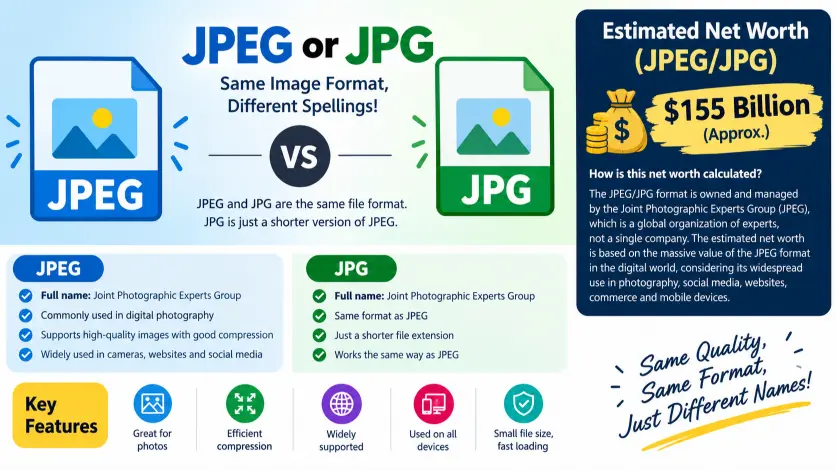
The terms have the same technical origin. JPEG stands for Joint Photographic Experts Group, the organization that developed the image compression standard. .jpeg is the longer version of the filename extension, while .jpg is the shortened three character version.
This distinction goes back to older computer systems that placed restrictions on filename extensions. In particular, early Microsoft operating environments commonly used an extension structure limited to three characters. Because jpeg contains four letters, it was shortened to jpg.
Today, modern operating systems, browsers, editing programs, smartphones, websites, and content management systems generally recognize both extensions without difficulty.
| Feature | JPEG | JPG |
|---|---|---|
| Full name | Joint Photographic Experts Group | Joint Photographic Experts Group |
| File extension | .jpeg | .jpg |
| Image standard | JPEG | JPEG |
| Compression | Usually lossy | Usually lossy |
| Typical use | Photos and web images | Photos and web images |
| Image quality | Depends on compression settings | Depends on compression settings |
| Transparency | Not natively supported | Not natively supported |
| Modern compatibility | Excellent | Excellent |
| Main difference | Four letter extension | Three letter extension |
Quick recap
JPEG and JPG normally identify the same underlying image format.
The main difference is the filename extension, not the image compression technology.
.jpg became popular because older systems preferred three character extensions.
For modern users, either extension is usually acceptable.
Is JPEG vs JPG a Grammar, Vocabulary, or Usage Issue?
The confusion around JPEG and JPG isn’t really a grammar issue. It is primarily a technology terminology and file extension issue.
Neither term is a different grammatical form of the other. They don’t represent different parts of speech in the way that words such as “advise” and “advice” do. Instead, they are two common ways of naming files that use the JPEG image standard.
From a vocabulary perspective, JPEG is the name associated with the image standard itself, while JPG is commonly used as the shortened file extension. In everyday conversation, however, people often use both terms interchangeably.
In formal technical writing, “JPEG” can be preferable when discussing the actual image format or compression standard. When discussing a filename, “JPG” may be used simply because the file happens to end in .jpg.
In casual communication, there is usually no practical difference. Someone asking you to “send the photo as a JPG” will generally accept a .jpeg file if the application supports it.
Academic and professional writing should be slightly more precise. If you’re explaining image compression, call the standard JPEG. If you’re referring to a specific filename extension, use the extension that actually appears in the file.
What Does JPEG Mean?
JPEG is an acronym associated with the Joint Photographic Experts Group, the group responsible for developing the image compression standard.
The JPEG standard became influential because it offered an effective way to reduce photographic image sizes while retaining enough visual quality for practical use.
Unlike formats designed primarily for simple graphics, JPEG works particularly well with photographs containing many colors, subtle gradients, shadows, textures, and continuous tones.
JPEG compression can significantly reduce file size. That makes it especially useful when images need to be stored, transmitted, uploaded, or displayed efficiently.
Workplace example
A marketing employee might tell a designer:
“Please export the product photograph as JPEG.”
Here, JPEG refers to the image format rather than a specific filename extension.
Academic example
A student writing about digital imaging might say:
“JPEG compression reduces image file size by removing visual information that may be less noticeable to the viewer.”
In this context, JPEG is the appropriate technical term.
Technology example
A photo editing application may provide export choices such as JPEG, PNG, TIFF, and other formats. The JPEG option determines the type of encoded image that will be produced.
Usage recap
Use JPEG when discussing the image format or compression standard.
It is particularly appropriate in technical, educational, and professional explanations.
The term describes the underlying technology rather than merely the letters appearing after a filename.
What Does JPG Mean?
JPG is a shortened form commonly used as a filename extension for JPEG images.
A filename such as vacation.jpg contains the .jpg extension. That extension tells the operating system and compatible software what type of file it is likely dealing with.
The three character extension became popular because older computing environments imposed restrictions on filename extensions. Shortening jpeg to jpg allowed the format to fit those limitations.
Modern computers aren’t generally restricted in the same way, which is why .jpeg is also widely supported.
Workplace example
A company may ask an employee to upload profile.jpg to its website. The instruction refers to the filename extension.
Academic example
A research assignment might specify that photographs should be submitted in JPG format to keep the document size manageable.
Technology example
A website upload form may accept .jpg, .jpeg, and other image extensions. If both JPEG extensions are supported, there is usually no meaningful quality difference between them.
Usage recap
Use JPG when referring specifically to a .jpg filename extension.
It isn’t a separate compression standard.
A JPG file and a JPEG file can contain images encoded using the same JPEG standard.
When You Should NOT Use JPEG or JPG
Although JPEG and JPG are usually interchangeable, neither should automatically be your first choice for every image.
Here are common situations where another format may work better.
- When an image requires transparency
JPEG does not provide native transparency. Logos, icons, overlays, and graphics requiring transparent backgrounds are often better suited to formats that support alpha transparency.
- When you need repeated editing
JPEG uses lossy compression in common implementations. Repeatedly opening, editing, and saving an already compressed JPEG can gradually reduce image quality.
- When you need perfectly sharp text
Screenshots, diagrams, interface elements, and images containing substantial text may look cleaner in a format designed for lossless or sharper graphic reproduction.
- When you need lossless photographic storage
Professional workflows may require formats that preserve image information more completely than ordinary JPEG compression.
- When the image contains simple graphics
Flat colors and sharp edges can sometimes be represented more efficiently by another image format.
- When maximum photographic quality is required
A heavily compressed JPEG may produce visible artifacts around edges, fine textures, and high contrast areas.
- When modern web performance requires a newer format
Some websites use newer image formats to achieve smaller files at comparable visual quality. The best choice depends on browser support, workflow requirements, and the site’s performance strategy.
- When an organization requires a specific format
If a printing company, employer, university, government service, or publishing platform specifies a particular format, follow its instructions instead of assuming JPEG is acceptable.
Common JPEG and JPG Mistakes
The biggest mistake is assuming that .jpeg and .jpg represent two different generations of image quality.
They generally don’t.
| Correct sentence | Incorrect sentence | Explanation |
|---|---|---|
| “Save the photograph as a JPEG.” | “JPEG is always higher quality than JPG.” | The extension does not determine image quality. |
“Upload the file with the .jpg extension.” | “JPG is a completely different format.” | JPG is commonly a shortened extension for JPEG. |
| “The image was compressed as JPEG.” | “Changing JPG to JPEG automatically improves quality.” | Renaming an extension does not restore lost image data. |
| “This website accepts JPG and JPEG.” | “Only JPG files contain JPEG images.” | Both extensions can represent JPEG encoded images. |
| “Choose a higher JPEG quality setting when exporting.” | “The JPG extension controls compression quality.” | Compression settings are determined during encoding, not by the extension alone. |
Decision Rule Box
If you mean the JPEG image standard or compression technology, use “JPEG.”
If you mean a filename ending in .jpg, use “JPG.”
Do not choose between them based on expected image quality. The extension itself does not make an image sharper, larger, or better.
This is the more accurate decision rule because JPEG and JPG aren’t different actions, people, or tools. They are closely related terminology for the same established image format.
JPEG and JPG in Modern Technology and Tools
Modern technology has made the distinction even less important for everyday users.
Photo applications, smartphones, browsers, operating systems, social platforms, design programs, and modern technology powered image tools commonly work with JPEG images. Many systems accept both .jpg and .jpeg.
An AI image workflow may involve several stages. A user might generate or edit an image, export it as JPEG, upload it to a website, resize it, and then compress it for faster delivery.
During that process, changing the filename from .jpg to .jpeg does not magically improve the image. Similarly, changing .jpeg to .jpg doesn’t normally create a smaller or sharper image.
What matters more is the actual encoding, image dimensions, compression level, color information, and the software used to process the image.
For website owners, this distinction is important because image optimization should focus on measurable factors such as file size, visual quality, loading performance, responsive dimensions, and appropriate format selection.
Modern tools can also produce images in different formats depending on their export options. If an application gives you a choice between JPG and JPEG, you can normally select either when both are supported by your intended destination.
Why Are JPEG Files Sometimes Smaller or Larger Than JPG Files?
A common misconception is that .jpg files are automatically smaller than .jpeg files.
The extension does not determine file size.
Two images containing identical visual content can have different file sizes because of their compression settings, dimensions, metadata, color information, editing history, and encoding software.
For example, a 4000 pixel photograph saved with high quality may be considerably larger than a 1200 pixel version of the same photograph. Both could use .jpg.
Likewise, two files with the .jpeg extension can have dramatically different sizes.
If someone tells you that JPG is smaller than JPEG simply because it has fewer letters in the extension, that’s a misunderstanding. The characters used in the filename have virtually nothing to do with the amount of image data stored inside the file.
Can You Convert JPEG to JPG Without Losing Quality?
Yes, if you’re simply changing the filename extension appropriately and the file is already a JPEG image, changing .jpeg to .jpg does not inherently reduce image quality.
However, there’s an important distinction between renaming and re encoding.
Renaming a file changes how its filename appears. Re encoding means opening the image and saving it again using an image encoder.
If you open a JPEG image and export it again with lossy compression, the image may undergo another compression cycle. Depending on the settings, that can introduce additional artifacts.
Therefore, changing a valid JPEG filename extension is fundamentally different from converting the image through an editing application.
If a website requires .jpg, check whether it truly rejects .jpeg. If it does, a proper conversion or extension change may be necessary depending on the system.
JPEG or JPG: Which Is Better for Websites?
For most websites, neither extension is inherently better in terms of image quality.
The more important question is whether JPEG is the appropriate image format for the specific image.
Photographs often work well as JPEG because compression can substantially reduce file size while maintaining visually acceptable quality.
However, website performance involves more than choosing between two extensions. Image dimensions, compression level, responsive delivery, caching, metadata, and modern format support can have a greater effect on performance.
If a content management system accepts both extensions, choose the naming convention that best fits your site’s existing structure and remain consistent.
Consistency is particularly helpful for media libraries, file management, development workflows, and content teams.
A Short Etymology of JPEG and JPG
JPEG comes from Joint Photographic Experts Group, the name associated with the group that developed the standard.
The extension .jpeg reflects the acronym’s commonly recognized spelling.
.jpg emerged as a shortened extension because older operating systems and file naming conventions often favored or required three character extensions.
The shortening wasn’t intended to create a new image standard. It was primarily a practical adaptation to historical computer naming restrictions.
That history explains why both forms remain in use today.
Expert style quotation
“JPEG and JPG are best understood as two filename conventions surrounding the same established image format, not as competing image technologies.”
Two Practical Case Studies
Case Study 1: Website Product Photography
Imagine an online retailer with 500 product photographs.
The team initially assumes that changing every .jpeg file to .jpg will reduce storage requirements. After testing, they discover that renaming the extensions produces no meaningful file size reduction.
They instead resize unnecessarily large photographs and adjust compression settings while maintaining acceptable visual quality.
The result is a substantial reduction in total image data without relying on a misleading extension change.
The lesson is straightforward: optimize the image data, not the number of letters in the extension.
Case Study 2: University Submission Portal
A university submission system instructs students to upload photographs in JPG format.
A student has a file named research_photo.jpeg and assumes the image must be recreated because it isn’t a JPG.
After checking the portal requirements, the student discovers that the system accepts JPEG files as well. No visual conversion is required.
If the system genuinely requires the .jpg extension, the filename may need to be adjusted or the file converted according to the portal’s requirements.
The practical result is less unnecessary editing and no avoidable quality loss.
JPEG and JPG Error Prevention Checklist
Always use JPEG when
- You’re discussing the underlying image format.
- You’re explaining JPEG compression.
- You’re writing technical or educational material about the standard.
- You’re describing photographic image encoding in general.
Use JPG when
- You’re specifically referring to a
.jpgfilename. - A software system explicitly requests the JPG extension.
- Your organization’s file naming convention uses
.jpg. - You’re documenting an existing file that ends in
.jpg.
Never assume that
- JPG automatically produces smaller files.
- JPEG automatically provides better quality.
- Changing the extension restores lost image information.
- JPG and JPEG are two separate compression standards.
- Renaming a file is the same thing as re encoding it.
Related Grammar Confusions You Should Master
Although JPEG and JPG are technical terminology rather than a traditional grammar confusion, learning similar distinctions can make technical writing much clearer.
Here are related language and usage topics worth mastering:
- Advice vs advise: noun versus verb.
- Affect vs effect: commonly confused grammatical functions.
- Practice vs practise: noun and verb distinctions in different varieties of English.
- Everyday vs every day: adjective versus phrase.
- Login vs log in: noun or adjective versus verb phrase.
- Setup vs set up: noun or adjective versus verb phrase.
- Backup vs back up: noun or adjective versus verb.
- Website vs web site: changing technology terminology and usage.
- Data vs datum: technical vocabulary and number agreement.
- Copyright vs copywrite: a spelling and terminology confusion.
The broader lesson is that technical English often contains terms that look almost identical while serving different purposes. Understanding context is usually more useful than memorizing isolated rules.
Advanced FAQs
Is JPEG better than JPG?
No. JPEG and JPG generally refer to the same image format. The difference is primarily the filename extension, not the image quality.
Is JPG the same as JPEG?
Yes, in ordinary modern usage, a JPG file is generally a JPEG image. .jpg is simply a shorter filename extension associated with the JPEG standard.
Which is better for quality, JPEG or JPG?
Neither is inherently better for quality. Image quality depends primarily on the compression settings, dimensions, encoding process, and source image.
Why does JPEG have two extensions?
The .jpg extension became popular because older computer systems commonly imposed three character filename extension restrictions. .jpeg uses the longer spelling.
Should I save photos as JPG or JPEG?
Either is normally suitable for photographs when both are accepted by your software or destination. Choose based on compatibility, naming conventions, and workflow consistency.
Does changing JPG to JPEG improve quality?
No. Renaming a valid JPG file to use a JPEG extension does not restore image information or increase resolution.
Does JPG compress more than JPEG?
No. The extension itself doesn’t determine the compression level. JPG and JPEG files can use the same JPEG encoding with different compression settings.
Is JPEG or JPG better for a website?
Neither extension is automatically better. For websites, the more important considerations are image dimensions, compression, file size, visual quality, browser support, and the requirements of the site’s image workflow.
Can I rename a JPEG file to JPG?
If the file is genuinely a JPEG image and the destination accepts the .jpg extension, changing the extension can be appropriate. Don’t confuse simple renaming with re encoding the image.
Why do photographers use JPEG?
JPEG is widely used because it can significantly reduce photographic file sizes while retaining visually useful quality. This makes it convenient for sharing, storage, publishing, and everyday digital photography.
Conclusion:
The confusion between JPEG and JPG is mostly historical rather than technical. Both extensions are commonly used for images encoded with the JPEG standard, and neither one automatically produces better quality. The easiest way to remember the distinction is this: JPEG is the standard and commonly used name for the image format, while JPG is a shortened filename extension.
For everyday photographs, websites, documents, and digital sharing, either extension will usually work when the receiving system supports both. What matters far more than the extension is how the image was encoded, how much compression was applied, its dimensions, and whether the format suits the intended use.
If you’re writing technical content, referring to the JPEG format is generally the clearest choice. If you’re talking about a particular filename ending in .jpg, JPG is perfectly appropriate. In short, don’t choose between JPEG and JPG based on quality claims. Choose based on context, compatibility, and your file naming requirements.